 Recently I watched in horror as my mother in law was trying to work out what income and expenses she has had over the last few years on a property which she jointly owns but has been renting out. Hearing tales of her requesting 9 years worth of bank statements and scratching around in the loft sorting through boxes full of unsorted paperwork desperately seeking old tax returns left me shrugging my shoulders in dis-belief.
Over the last few years I’ve developed a pretty easy and efficient system for documenting all the data I need to complete my tax return each year. My aim is to make the process of filling in my HMRC Self Assessment Tax Return as pain free as possible. By following the system below, when I sit down to complete my return each year it takes roughly 20 minutes from start to end.
My Self Assessment System
- Paperwork: For each tax year I simply use one plastic folder and assemble all of the key statements/documents I need to make my return throughout the year.
- Spreadsheet: This details all of the income/expenses related to my rental properties as well as other information required to complete the self assessment is logged on a single Excel spreadsheet.
Lets take a closer look….
The Paperwork
At the start of each tax I start a new folder labelled with the tax year. As any relevant paperwork hits the doormat throughout the year it immediately get placed inside the folder. Here’s a few examples of what is inside:
- Any letters from the Inland Revenue detailing my tax code
- P60 tax statement from my employer (details my earnings and PAYE tax paid throughout the year)
- P11D tax statement from my employer (details any additional benefit/expenses related to my employment)
- Mortgage interest statements for all my buy to let mortgages1
- Savings interest statements for all bank accounts2
- An A5 envelope for any buy to let receipts/invoices paid
- Dividend certificates from any taxable investment accounts
The Hardest Thing in the World to Understand is Income Taxes
Albert Enstein, 1963
The Spreadsheet
You can download an example of my spreadsheet here.
1. Property Income & Expenses. The main bulk of the spreadsheet is used to track all of the income and expenses generated from my property investments. If you’re a landlord you will know that there are lots of expenses related to being a landlord. While nobody likes expenses, they do reduce your tax bill so it is vital to log them all and maximise any tax savings.
To simplify this process, and ensure I miss nothing I use one bank account solely for the purpose of my buy to let properties. Any rental income, repair expenses, insurances, agency fees, ground rents, travel expenses etc are put through this bank account. The account is never used for any non property related transactions meaning the account statements provide a full record of all of my property transactions.
Every 2-3 months or so I simply download all of the entries from this bank account into the excel sheet (the ‘BTL Cash Flows tab). The first three columns are pasted in directly from my online banking screen.
Next I simply populate columns D:H:
- Column D. A brief summary of the item in case I need to reference the invoice/receipts
- Column E. Which property the item relates to
- Column F. Category (Expense or Rent)
- Column G. This is the HMRC category used on the self assessment form. This one saves a lot of time later on!
- Column H. The tax year. No need for additional sheets each year thanks to this column.
The final two columns (I:J) are simple concatenations that enable me to sum the data in a useful way when it comes to the return sheet.
As is the case with all of my financial spreadsheets they are religiously backed up, both to an external hard drive and into the cloud.
2. Everything else. Finally I create a new tab for each tax year (e.g. “2013/14 return”).
First under the ‘Property’section I use a couple of ‘sumif’ formulae to add up my property income, then expenses (cells C15:C19) in the categories required by the HMRC self assessment form online.
In cells C8:C10 I input the mortgage interest amount for each property using the certificates the mortgage company sent me.
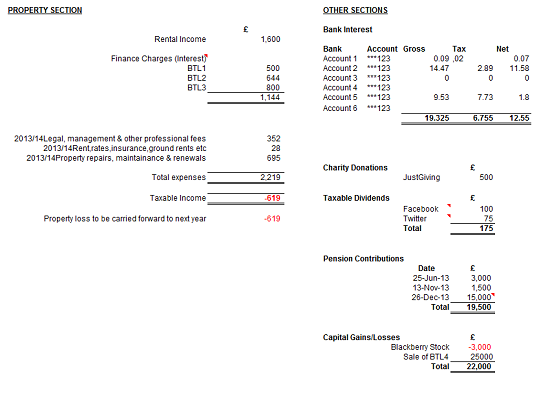
Finally on the right hand sections I log any other relevant information that I will need to complete my return. Examples include:
- Details of all (taxable) dividends received outside of my ISAs/NISAs3
- List of all charitable donations4
- Details of all pension contributions made
- Details of any capital gains/losses
Once this summary page is completed, I have all of the information I need to complete my tax return. It’s time to head to the HMRC website.
Summary
Having a simple system like this enables me gather/file the required information needed for completing my self assessment tax return each year with very little effort.
Once I have all of the data either in the plastic folder or in my spreadsheet the actual return usually takes me well under 20 minutes to compete from start to finish. Not only that but I have all of the relevant information filed such that I can access any of it quickly and easily if required.
Why so many people pay north of £200 for an accountant to do this work is beyond me.
In fact my mother in law pays approximately £350 for someone else to do the dirty work and she is still unable to determine what her income/expenses were relating to her property 2 years ago!
Do you have any tax return tips?
Notes:
1I call round the mortgage companies on the 6th April each year to order these
2Again I call to order these on the 6th April each year
3I already have this data logged on my ISA portfolio spreadsheet
4If you donate via JustGiving you can log into your account and download your donation history for the year 😉


Leave a Reply to Monevator Cancel reply